Intégration d'OpenClaw avec WeChat
OpenClaw (anciennement Clawdbot) est une passerelle d'agent IA open source et local-first qui permet à de grands modèles de langage de fonctionner 24/7 sur votre ordinateur/serveur, avec prise en charge de l'utilisation directe de l'ordinateur, de la navigation web, de l'exécution de commandes et d'une intégration transparente avec des plateformes de chat telles que Feishu, Telegram et Discord.
Dans ce chapitre, nous allons intégrer OpenClaw avec Feishu afin de mettre en œuvre des scénarios d'automatisation tels que l'envoi de messages, l'envoi d'images, la réception de fichiers, les interactions d'approbation et la synchronisation des données.
Si vous n'avez pas encore installé OpenClaw, vous devez d'abord l'installer :
Utilisez la commande npm pour installer globalement :
npm install -g openclaw@latest --registry=https://registry.npmmirror.com
Ou installez avec la commande pnpm :
pnpm add -g openclaw@latest
Pour une installation détaillée d'OpenClaw, consultez :Tutoriel OpenClaw (Clawdbot)。
Intégration en un clic pour WeChat personnel (plugin ClawBot, iOS 8.0.70+)
Prérequis
- Version de WeChat : iOS 8.0.70 ou supérieure
- Une instance OpenClaw déployée et en cours d'exécution (en local ou sur un serveur)
Étapes
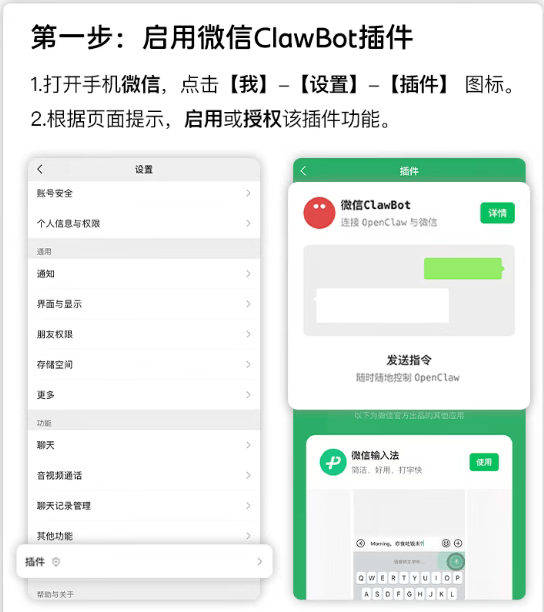
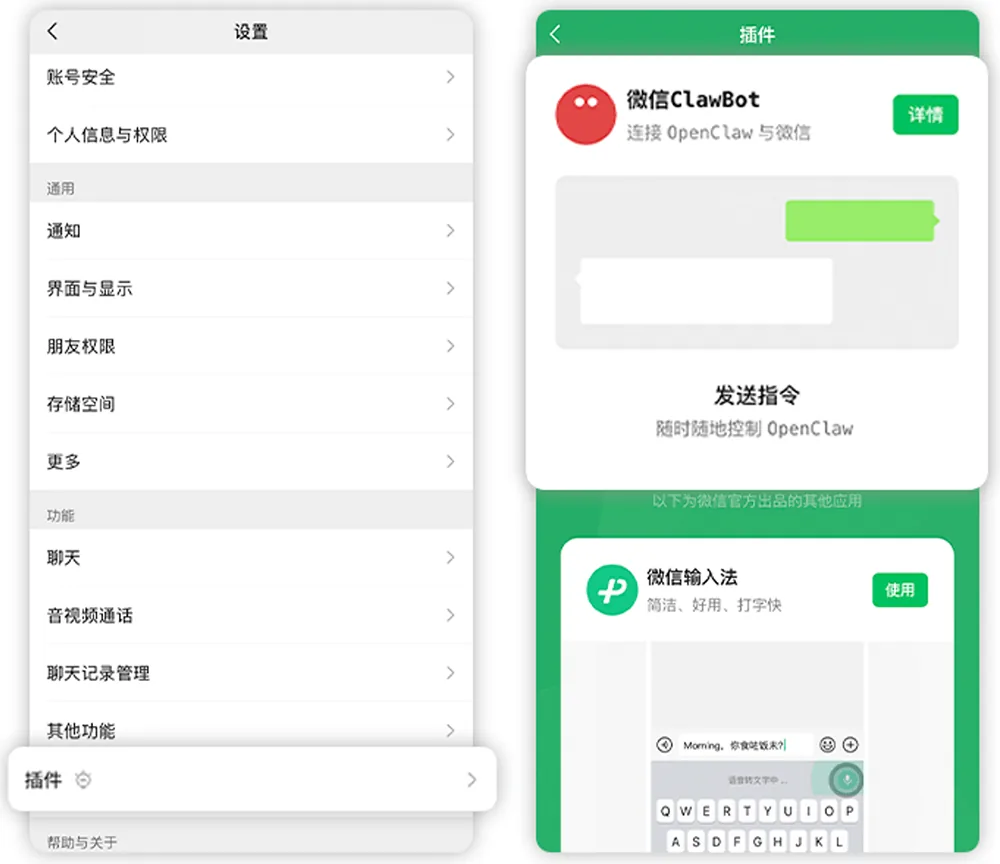
Ouvrez WeChat → Moi → Paramètres → Plugins.
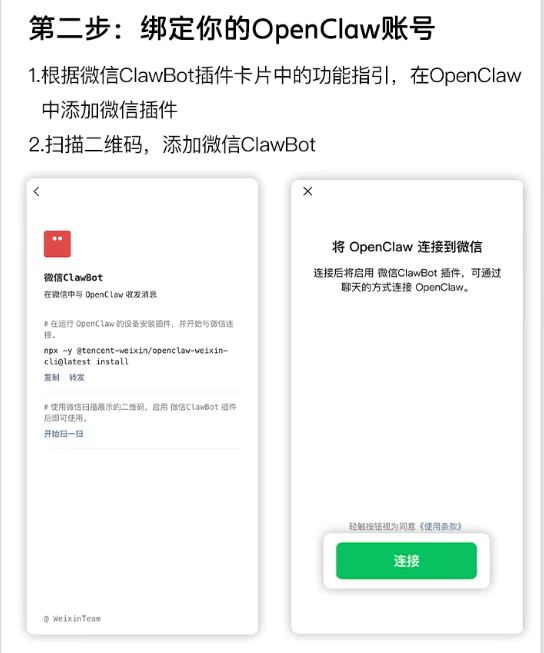
Trouvez la carte "ClawBot", cliquez pour entrer, et vous pouvez voir l'invite de commande d'installation.
Copiez la commande d'installation du terminal (ou vous pouvez exécuter directement cette étape) :
npx -y @tencent-weixin/openclaw-weixin-cli@latest install
Exécutez cette commande dans le terminal de l'appareil où se trouve OpenClaw :

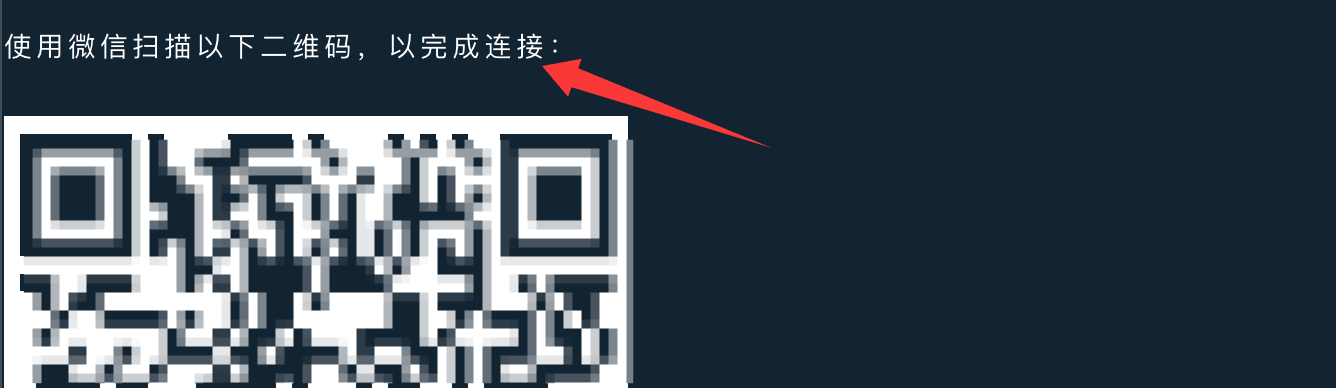
Après l'exécution de la commande, un QR code sera généré. Utilisez WeChat pour scanner et lier :
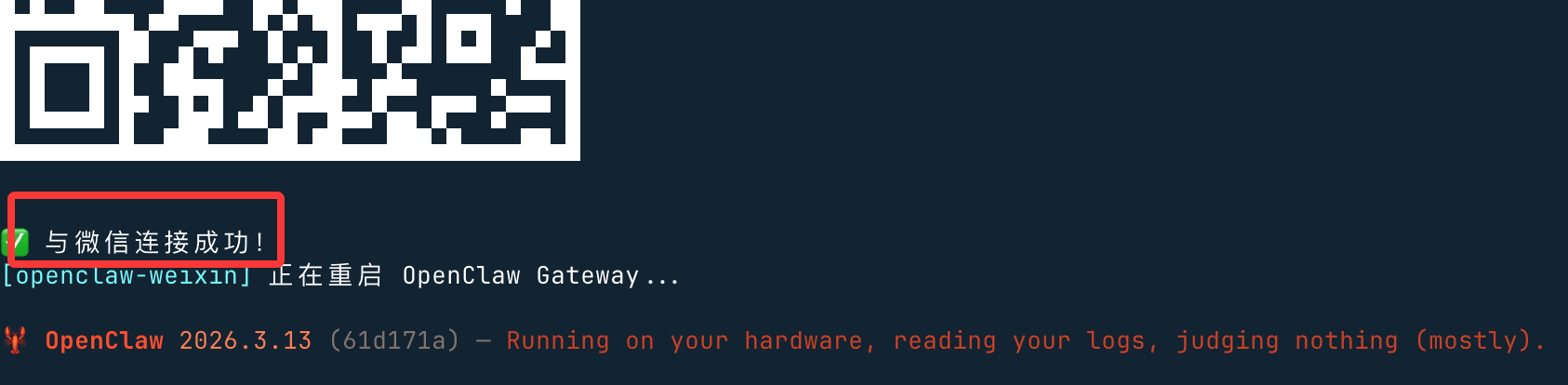
Après un scan réussi, il affichera "connexion réussie" et redémarrera :
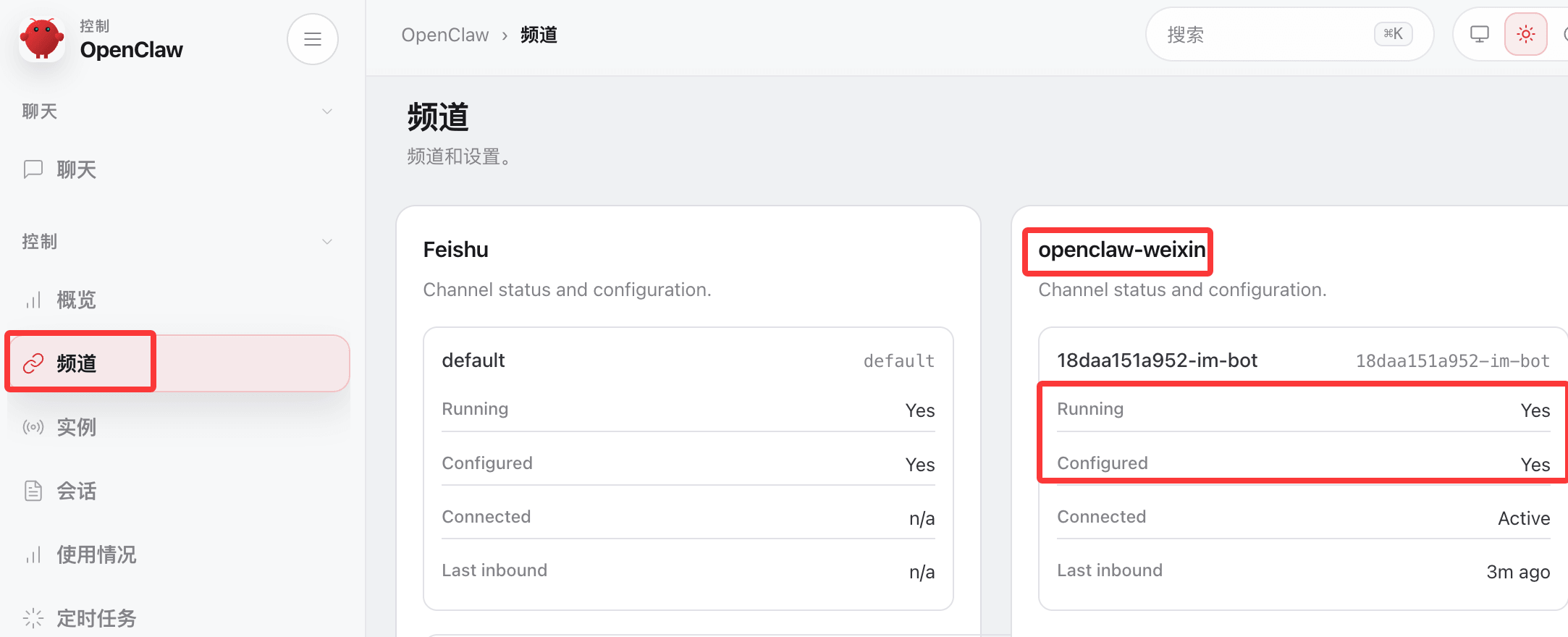
Accédez au backend d'OpenClaw, vérifiez les canaux et constatez que WeChat a été déployé :
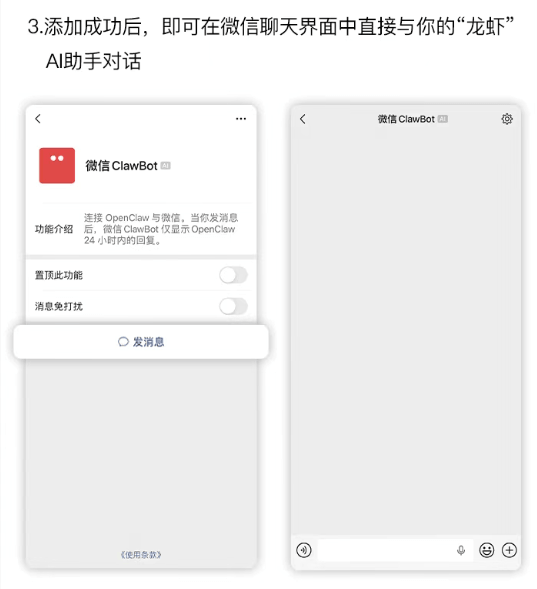
Après une liaison réussie, vous pouvez discuter directement avec OpenClaw dans la fenêtre de chat WeChat :

Problèmes pour les utilisateurs Windows
Si les utilisateurs Windows utilisent npx, ils peuvent obtenir une erreur :openclaw not foundLa raison est que npx utilise la commande Linux "which" pour détecter openclaw. Windows n'a pas "which", donc il signale "openclaw not found".

La solution consiste à utiliser la commande plugin d'openclaw pour installer :
openclaw plugins install "@tencent-weixin/openclaw-weixin"
Activer le plugin :
openclaw config set plugins.entries.openclaw-weixin.enabled true
Connexion par QR code :
openclaw channels login --channel openclaw-weixin
Un QR code apparaîtra dans le terminal. Scannez-le avec WeChat sur votre téléphone et confirmez l'autorisation.
Si le plugin ne s'installe toujours pas, vous pouvez utiliser le script cli.mjs fourni par l'internaute@百里凌涵, et le placer dans le même répertoire que les fichiers package.json et LICENSE. Le code est le suivant ; exécutez ensuite le script pour poursuivre l'installation.
node ./cli.mjs install
cli.mjsContenu du fichier :
import { execSync, spawnSync } from "node:child_process";
const PLUGIN_SPEC = "@tencent-weixin/openclaw-weixin";
const CHANNEL_ID = "openclaw-weixin";
// ── utilitaires ──────────────────────────────────────────────────────────────────
function log(msg) {
console.log(`\x1b[36m[openclaw-weixin]\x1b[0m ${msg}`);
}
function error(msg) {
console.error(`\x1b[31m[openclaw-weixin]\x1b[0m ${msg}`);
}
function run(cmd, { silent = true } = {}) {
const stdio = silent ? ["pipe", "pipe", "pipe"] : "inherit";
const result = spawnSync(cmd, { shell: true, stdio });
if (result.status !== 0) {
const err = new Error(`La commande a échoué avec le code de sortie ${result.status}: ${cmd}`);
err.stderr = silent ? (result.stderr || "").toString() : "";
throw err;
}
return silent ? (result.stdout || "").toString().trim() : "";
}
function which(bin) {
try {
return execSync(`which ${bin}`, { encoding: "utf-8", stdio: ["pipe", "pipe", "pipe"] }).trim();
} catch {
return null;
}
}
// ── commandes ─────────────────────────────────────────────────────────────────
function install() {
// 1. Vérifier que openclaw est installé
//if (!which("openclaw")) {
// error("openclaw introuvable, veuillez d'abord l'installer : ");
// console.log(" npm install -g openclaw");
// console.log(" Voir https://docs.openclaw.ai/install");
// process.exit(1);
//}
log("openclaw trouvé installé localement");
// 2. Installer le plugin via openclaw
log("Installation du plugin...");
try {
const installOut = run(`openclaw plugins install "${PLUGIN_SPEC}"`);
if (installOut) log(installOut);
} catch (installErr) {
if (installErr.stderr && installErr.stderr.includes("existe déjà")) {
log("Installation locale détectée, mise à jour en cours...");
try {
const updateOut = run(`openclaw plugins update "${CHANNEL_ID}"`);
if (updateOut) log(updateOut);
} catch (updateErr) {
error("Échec de la mise à jour du plugin, veuillez exécuter manuellement : ");
if (updateErr.stderr) console.error(updateErr.stderr);
console.log(` openclaw plugins update "${CHANNEL_ID}"`);
process.exit(1);
}
} else {
error("Échec de l'installation du plugin, veuillez exécuter manuellement : ");
if (installErr.stderr) console.error(installErr.stderr);
console.log(` openclaw plugins install "${PLUGIN_SPEC}"`);
process.exit(1);
}
}
// 3. Connexion (scan QR interactif)
log("Plugin prêt, démarrage de la première connexion...");
try {
run(`openclaw channels login --channel ${CHANNEL_ID}`, { silent: false });
} catch {
console.log();
error("Première connexion non terminée. Vous pouvez réessayer manuellement plus tard : ");
console.log(` openclaw channels login --channel ${CHANNEL_ID}`);
}
// 4. Redémarrer le gateway pour qu'il prenne en compte le nouveau compte
log("Redémarrage d'OpenClaw Gateway...");
try {
run(`openclaw gateway restart`, { silent: false });
} catch {
error("Échec du redémarrage. Vous pouvez exécuter manuellement : ");
console.log(` openclaw gateway restart`);
}
}
function help() {
console.log(`
Utilisation: npx -y @tencent-weixin/openclaw-weixin-cli <Commande>
Commande:
install Installer le plugin WeChat et scanner le code QR pour se connecter
help Afficher les informations d'aide
`);
}
// ── main ─────────────────────────────────────────────────────────────────────
const command = process.argv[2];
switch (command) {
case "install":
install();
break;
case "help":
case "--help":
case "-h":
help();
break;
default:
if (command) {
error(`Commande inconnue: ${command}`);
}
help();
process.exit(command ? 1 : 0);
}
fichier package.json :
package.json
"name": "@tencent-weixin/openclaw-weixin-cli",
"version": "1.0.2",
"description": "Installateur léger pour le plugin de canal OpenClaw Weixin",
"license": "MIT",
"author": "Tencent",
"type": "module",
"bin": {
"weixin-installer": "./cli.mjs"
},
"files": [
"cli.mjs"
],
"engines": {
"node": ">=22"
}
}
Code du fichier LICENSE :
MIT License

Copyright (c) 2026 Tencent Inc.

Permission is hereby granted, free of charge, to any person obtaining a copy
of this software and associated documentation files (the "Software"), to deal
in the Software without restriction, including without limitation the rights
to use, copy, modify, merge, publish, distribute, sublicense, and/or sell
copies of the Software, and to permit persons to whom the Software is
furnished to do so, subject to the following conditions:

The above copyright notice and this permission notice shall be included in all
copies or substantial portions of the Software.

THE SOFTWARE IS PROVIDED "AS IS", WITHOUT WARRANTY OF ANY KIND, EXPRESS OR
IMPLIED, INCLUDING BUT NOT LIMITED TO THE WARRANTIES OF MERCHANTABILITY,
FITNESS FOR A PARTICULAR PURPOSE AND NONINFRINGEMENT. IN NO EVENT SHALL THE
AUTHORS OR COPYRIGHT HOLDERS BE LIABLE FOR ANY CLAIM, DAMAGES OR OTHER
LIABILITY, WHETHER IN AN ACTION OF CONTRACT, TORT OR OTHERWISE, ARISING FROM,
OUT OF OR IN CONNECTION WITH THE SOFTWARE OR THE USE OR OTHER DEALINGS IN THE
SOFTWARE.
Processus d'installation