Uso de la vista dividida
La vista dividida es un controlador de vista específico del iPad que se utiliza para gestionar dos controladores de vista: a la izquierda hay un controlador maestro, y a su derecha hay un controlador de vista de detalle. Propiedades importantes.
- delegate
- viewControllers
Código de ejemplo y pasos
1. Cree un nuevo proyecto, seleccione Master Detail Application y haga clic en Siguiente, introduzca el nombre del proyecto y luego seleccione Crear.
2. El controlador de vista dividida simple con la vista de tabla en el maestro se crea de forma predeterminada.
3. Aquí tenemos los siguientes archivos que hemos creado.
- AppDelegate.h
- AppDelegate.m
- DetailViewController.h
- DetailViewController.m
- DetailViewController.xib
- MasterViewController.h
- MasterViewController.m
- MasterViewController.xib
4. El archivo AppDelegate.h se muestra a continuación
#import <UIKit/UIKit.h>

@interface AppDelegate : UIResponder <UIApplicationDelegate>

@property (strong, nonatomic) UIWindow *window;

@property (strong, nonatomic) UISplitViewController *splitViewController;

@end
5. El método didFinishLaunchingWithOptions en AppDelegate.m se muestra a continuación
 - (BOOL)application:(UIApplication *)application
   didFinishLaunchingWithOptions:(NSDictionary *)launchOptions
   self.window = [[UIWindow alloc] initWithFrame:[[UIScreen mainScreen]
   bounds]];
    // Override point for customization after application launch.
    MasterViewController *masterViewController = [[MasterViewController
    alloc] initWithNibName:@"MasterViewController" bundle:nil];
    UINavigationController *masterNavigationController =
    [[UINavigationController alloc] initWithRootViewController:
    masterViewController];

    DetailViewController *detailViewController =
    [[DetailViewController alloc] initWithNibName:@"DetailViewController"
    bundle:nil];
    UINavigationController *detailNavigationController =
    [[UINavigationController alloc] initWithRootViewController:
    detailViewController];

    masterViewController.detailViewController = detailViewController;

    self.splitViewController = [[UISplitViewController alloc] init];
    self.splitViewController.delegate = detailViewController;
    self.splitViewController.viewControllers =
    @[masterNavigationController, detailNavigationController];
    self.window.rootViewController = self.splitViewController;
    [self.window makeKeyAndVisible];
    return YES;
}
6. MasterViewController.h, como se muestra a continuación
#import <UIKit/UIKit.h>

@class DetailViewController;

@interface MasterViewController : UITableViewController

@property (strong, nonatomic) DetailViewController *detailViewController;

@end
7. MasterViewController.m, como se muestra a continuación
#import "MasterViewController.h"

#import "DetailViewController.h"

@interface MasterViewController () {
    NSMutableArray *_objects;
}
@end

@implementation MasterViewController

- (id)initWithNibName:(NSString *)nibNameOrNil bundle:(NSBundle *)
  nibBundleOrNil
{
    self = [super initWithNibName:nibNameOrNil bundle:nibBundleOrNil];
    if (self) {
        self.title = NSLocalizedString(@"Master", @"Master");
        self.clearsSelectionOnViewWillAppear = NO;
        self.contentSizeForViewInPopover = CGSizeMake(320.0, 600.0);
    }
    return self;
}

- (void)viewDidLoad
{
    [super viewDidLoad];
    self.navigationItem.leftBarButtonItem = self.editButtonItem;

    UIBarButtonItem *addButton = [[UIBarButtonItem alloc]
    initWithBarButtonSystemItem: UIBarButtonSystemItemAdd
    target:self action:@selector(insertNewObject:)];
    self.navigationItem.rightBarButtonItem = addButton;
}

- (void)didReceiveMemoryWarning
{
    [super didReceiveMemoryWarning];
    // Dispose of any resources that can be recreated.
}

- (void)insertNewObject:(id)sender
{
    if (!_objects) {
        _objects = [[NSMutableArray alloc] init];
    }
    [_objects insertObject:[NSDate date] atIndex:0];
    NSIndexPath *indexPath = [NSIndexPath indexPathForRow:0 inSection:0];
    [self.tableView insertRowsAtIndexPaths:@[indexPath] withRowAnimation:
    UITableViewRowAnimationAutomatic];
}

#pragma mark - Table View

- (NSInteger)numberOfSectionsInTableView:(UITableView *)tableView
{
    return 1;
}

- (NSInteger)tableView:(UITableView *)tableView numberOfRowsInSection:
  (NSInteger)section
{
    return _objects.count;
}

// Customize the appearance of table view cells.
- (UITableViewCell *)tableView:(UITableView *)tableView cellForRowAtIndexPath:
  (NSIndexPath *)indexPath
{
    static NSString *CellIdentifier = @"Cell";

    UITableViewCell *cell = [tableView dequeueReusableCellWithIdentifier:
    CellIdentifier];
    if (cell == nil) {
        cell = [[UITableViewCell alloc] initWithStyle:
        UITableViewCellStyleDefault reuseIdentifier:CellIdentifier];
    }


    NSDate *object = _objects[indexPath.row];
    cell.textLabel.text = [object description];
    return cell;
}

- (BOOL)tableView:(UITableView *)tableView canEditRowAtIndexPath:
  (NSIndexPath *)indexPath
{
    // Return NO if you do not want the specified item to be editable.
    return YES;
}

- (void)tableView:(UITableView *)tableView commitEditingStyle:
  (UITableViewCellEditingStyle)editingStyle forRowAtIndexPath:
  (NSIndexPath *)indexPath
{
    if (editingStyle == UITableViewCellEditingStyleDelete) {
        [_objects removeObjectAtIndex:indexPath.row];
        [tableView deleteRowsAtIndexPaths:@[indexPath] withRowAnimation:
        UITableViewRowAnimationFade];
    } else if (editingStyle == UITableViewCellEditingStyleInsert) {
        // Create a new instance of the appropriate class, insert it into
        //the array, and add a new row to the table view.
    }
}

/*
// Override to support rearranging the table view.
- (void)tableView:(UITableView *)tableView moveRowAtIndexPath:
  (NSIndexPath *) fromIndexPath toIndexPath:(NSIndexPath *)toIndexPath
{
}
*/

/*
// Override to support conditional rearranging of the table view.
- (BOOL)tableView:(UITableView *)tableView canMoveRowAtIndexPath:
  (NSIndexPath *)indexPath
{
    // Return NO if you do not want the item to be re-orderable.
    return YES;
}
*/

- (void)tableView:(UITableView *)tableView didSelectRowAtIndexPath:
  (NSIndexPath *)indexPath
{
    NSDate *object = _objects[indexPath.row];
    self.detailViewController.detailItem = object;
    NSDateFormatter *formatter = [[NSDateFormatter alloc] init];
    [formatter setDateFormat: @"yyyy-MM-dd HH:mm:ss zzz"];
    NSString *stringFromDate = [formatter stringFromDate:object];
    self.detailViewController.detailDescriptionLabel.text = stringFromDate;
}

@end
8. DetailViewController.h, como se muestra a continuación
#import <UIKit/UIKit.h>

@interface DetailViewController : UIViewController
<UISplitViewControllerDelegate>

@property (strong, nonatomic) id detailItem;

@property (weak, nonatomic) IBOutlet UILabel *detailDescriptionLabel;
@end
9. DetailViewController.m, como se muestra a continuación
#import "DetailViewController.h"

@interface DetailViewController ()
@property (strong, nonatomic) UIPopoverController *masterPopoverController;
- (void)configureView;
@end

@implementation DetailViewController

#pragma mark - Managing the detail item

- (void)setDetailItem:(id)newDetailItem
{
    if (_detailItem != newDetailItem) {
        _detailItem = newDetailItem;

        // Update the view.
        [self configureView];
    }

    if (self.masterPopoverController != nil) {
        [self.masterPopoverController dismissPopoverAnimated:YES];
    }
}

- (void)configureView
{
    // Update the user interface for the detail item.

    if (self.detailItem) {
        self.detailDescriptionLabel.text = [self.detailItem description];
    }
}

- (void)viewDidLoad
{
    [super viewDidLoad];
    [self configureView];
}

- (void)didReceiveMemoryWarning
{
    [super didReceiveMemoryWarning];
    // Dispose of any resources that can be recreated.
}

- (id)initWithNibName:(NSString *)nibNameOrNil bundle:
  (NSBundle *)nibBundleOrNil
{
    self = [super initWithNibName:nibNameOrNil bundle:nibBundleOrNil];
    if (self) {
        self.title = NSLocalizedString(@"Detail", @"Detail");
    }
    return self;
}

#pragma mark - Split view

- (void)splitViewController:(UISplitViewController *)splitController
  willHideViewController:(UIViewController *)viewController withBarButtonItem:
  (UIBarButtonItem *)barButtonItem forPopoverController:
  (UIPopoverController *)popoverController
{
    barButtonItem.title = NSLocalizedString(@"Master", @"Master");
    [self.navigationItem setLeftBarButtonItem:barButtonItem animated:YES];
    self.masterPopoverController = popoverController;
}

- (void)splitViewController:(UISplitViewController *)splitController
  willShowViewController:(UIViewController *)viewController
  invalidatingBarButtonItem:(UIBarButtonItem *)barButtonItem
{
    // Called when the view is shown again in the split view,
    //invalidating the button and popover controller.
    [self.navigationItem setLeftBarButtonItem:nil animated:YES];
    self.masterPopoverController = nil;
}

@end
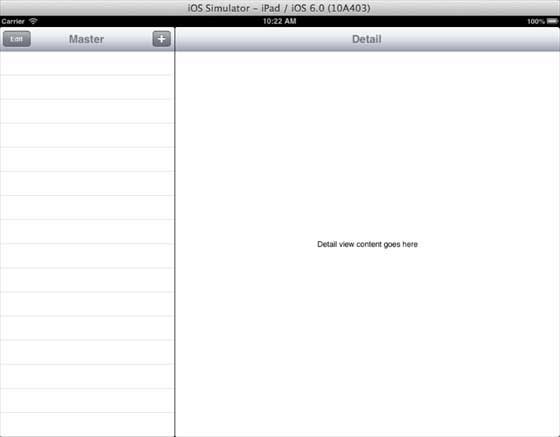
10. Ahora, cuando ejecutamos la aplicación, en modo horizontal obtenemos la siguiente salida
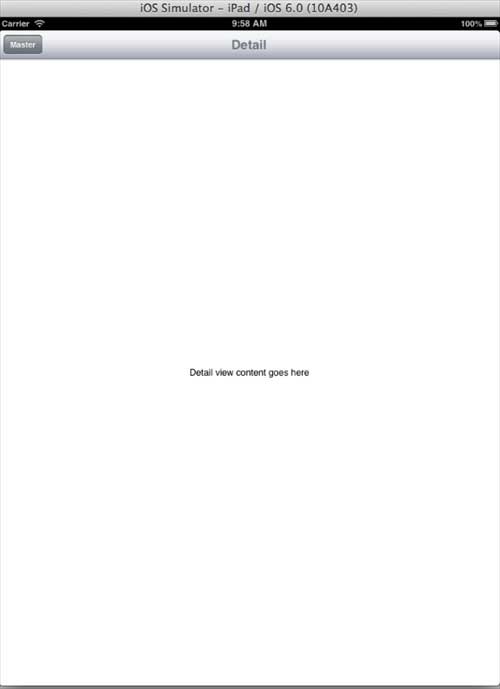
11. Cuando cambiamos al modo vertical, obtenemos la siguiente salida: