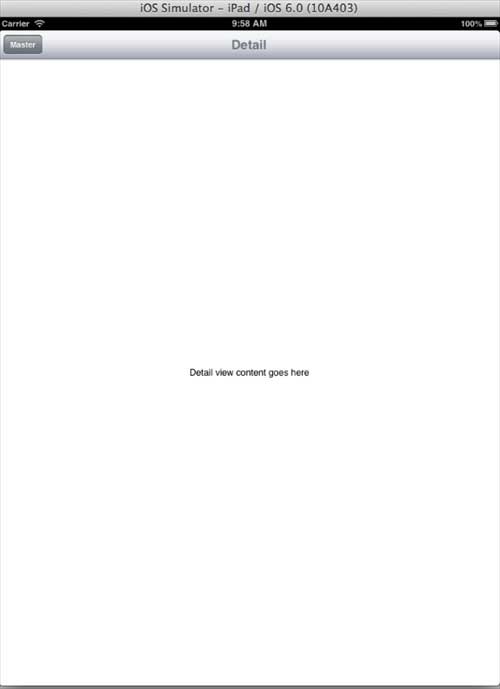
Utilisation de Split View
Split View est un contrôleur de vue spécifique à l’iPad utilisé pour gérer deux contrôleurs de vue : à gauche se trouve un contrôleur maître, et à droite un contrôleur de vue de détail. Propriétés importantes
- delegate
- viewControllers
Exemple de code et étapes
1. Créez un nouveau projet, sélectionnez Application maître-détail et cliquez sur Suivant, saisissez le nom du projet, puis sélectionnez Créer.
2. Un contrôleur de vue partagée simple avec une vue tableau dans le maître est créé par défaut.
3. Ici, les fichiers suivants ont été créés pour nous.
- AppDelegate.h
- AppDelegate.m
- DetailViewController.h
- DetailViewController.m
- DetailViewController.xib
- MasterViewController.h
- MasterViewController.m
- MasterViewController.xib
4. Le fichier AppDelegate.h se présente comme suit
#import <UIKit/UIKit.h>

@interface AppDelegate : UIResponder <UIApplicationDelegate>

@property (strong, nonatomic) UIWindow *window;

@property (strong, nonatomic) UISplitViewController *splitViewController;

@end
5. La méthode didFinishLaunchingWithOptions dans AppDelegate.m se présente comme suit
 - (BOOL)application:(UIApplication *)application
   didFinishLaunchingWithOptions:(NSDictionary *)launchOptions
   self.window = [[UIWindow alloc] initWithFrame:[[UIScreen mainScreen]
   bounds]];
    // Override point for customization after application launch.
    MasterViewController *masterViewController = [[MasterViewController
    alloc] initWithNibName:@"MasterViewController" bundle:nil];
    UINavigationController *masterNavigationController =
    [[UINavigationController alloc] initWithRootViewController:
    masterViewController];

    DetailViewController *detailViewController =
    [[DetailViewController alloc] initWithNibName:@"DetailViewController"
    bundle:nil];
    UINavigationController *detailNavigationController =
    [[UINavigationController alloc] initWithRootViewController:
    detailViewController];

    masterViewController.detailViewController = detailViewController;

    self.splitViewController = [[UISplitViewController alloc] init];
    self.splitViewController.delegate = detailViewController;
    self.splitViewController.viewControllers =
    @[masterNavigationController, detailNavigationController];
    self.window.rootViewController = self.splitViewController;
    [self.window makeKeyAndVisible];
    return YES;
}
6. MasterViewController.h se présente comme suit
#import <UIKit/UIKit.h>

@class DetailViewController;

@interface MasterViewController : UITableViewController

@property (strong, nonatomic) DetailViewController *detailViewController;

@end
7. MasterViewController.m se présente comme suit
#import "MasterViewController.h"

#import "DetailViewController.h"

@interface MasterViewController () {
    NSMutableArray *_objects;
}
@end

@implementation MasterViewController

- (id)initWithNibName:(NSString *)nibNameOrNil bundle:(NSBundle *)
  nibBundleOrNil
{
    self = [super initWithNibName:nibNameOrNil bundle:nibBundleOrNil];
    if (self) {
        self.title = NSLocalizedString(@"Master", @"Master");
        self.clearsSelectionOnViewWillAppear = NO;
        self.contentSizeForViewInPopover = CGSizeMake(320.0, 600.0);
    }
    return self;
}

- (void)viewDidLoad
{
    [super viewDidLoad];
    self.navigationItem.leftBarButtonItem = self.editButtonItem;

    UIBarButtonItem *addButton = [[UIBarButtonItem alloc]
    initWithBarButtonSystemItem: UIBarButtonSystemItemAdd
    target:self action:@selector(insertNewObject:)];
    self.navigationItem.rightBarButtonItem = addButton;
}

- (void)didReceiveMemoryWarning
{
    [super didReceiveMemoryWarning];
    // Dispose of any resources that can be recreated.
}

- (void)insertNewObject:(id)sender
{
    if (!_objects) {
        _objects = [[NSMutableArray alloc] init];
    }
    [_objects insertObject:[NSDate date] atIndex:0];
    NSIndexPath *indexPath = [NSIndexPath indexPathForRow:0 inSection:0];
    [self.tableView insertRowsAtIndexPaths:@[indexPath] withRowAnimation:
    UITableViewRowAnimationAutomatic];
}

#pragma mark - Table View

- (NSInteger)numberOfSectionsInTableView:(UITableView *)tableView
{
    return 1;
}

- (NSInteger)tableView:(UITableView *)tableView numberOfRowsInSection:
  (NSInteger)section
{
    return _objects.count;
}

// Customize the appearance of table view cells.
- (UITableViewCell *)tableView:(UITableView *)tableView cellForRowAtIndexPath:
  (NSIndexPath *)indexPath
{
    static NSString *CellIdentifier = @"Cell";

    UITableViewCell *cell = [tableView dequeueReusableCellWithIdentifier:
    CellIdentifier];
    if (cell == nil) {
        cell = [[UITableViewCell alloc] initWithStyle:
        UITableViewCellStyleDefault reuseIdentifier:CellIdentifier];
    }


    NSDate *object = _objects[indexPath.row];
    cell.textLabel.text = [object description];
    return cell;
}

- (BOOL)tableView:(UITableView *)tableView canEditRowAtIndexPath:
  (NSIndexPath *)indexPath
{
    // Return NO if you do not want the specified item to be editable.
    return YES;
}

- (void)tableView:(UITableView *)tableView commitEditingStyle:
  (UITableViewCellEditingStyle)editingStyle forRowAtIndexPath:
  (NSIndexPath *)indexPath
{
    if (editingStyle == UITableViewCellEditingStyleDelete) {
        [_objects removeObjectAtIndex:indexPath.row];
        [tableView deleteRowsAtIndexPaths:@[indexPath] withRowAnimation:
        UITableViewRowAnimationFade];
    } else if (editingStyle == UITableViewCellEditingStyleInsert) {
        // Create a new instance of the appropriate class, insert it into
        //the array, and add a new row to the table view.
    }
}

/*
// Override to support rearranging the table view.
- (void)tableView:(UITableView *)tableView moveRowAtIndexPath:
  (NSIndexPath *) fromIndexPath toIndexPath:(NSIndexPath *)toIndexPath
{
}
*/

/*
// Override to support conditional rearranging of the table view.
- (BOOL)tableView:(UITableView *)tableView canMoveRowAtIndexPath:
  (NSIndexPath *)indexPath
{
    // Return NO if you do not want the item to be re-orderable.
    return YES;
}
*/

- (void)tableView:(UITableView *)tableView didSelectRowAtIndexPath:
  (NSIndexPath *)indexPath
{
    NSDate *object = _objects[indexPath.row];
    self.detailViewController.detailItem = object;
    NSDateFormatter *formatter = [[NSDateFormatter alloc] init];
    [formatter setDateFormat: @"yyyy-MM-dd HH:mm:ss zzz"];
    NSString *stringFromDate = [formatter stringFromDate:object];
    self.detailViewController.detailDescriptionLabel.text = stringFromDate;
}

@end
8. DetailViewController.h se présente comme suit
#import <UIKit/UIKit.h>

@interface DetailViewController : UIViewController
<UISplitViewControllerDelegate>

@property (strong, nonatomic) id detailItem;

@property (weak, nonatomic) IBOutlet UILabel *detailDescriptionLabel;
@end
9. DetailViewController.m se présente comme suit
#import "DetailViewController.h"

@interface DetailViewController ()
@property (strong, nonatomic) UIPopoverController *masterPopoverController;
- (void)configureView;
@end

@implementation DetailViewController

#pragma mark - Managing the detail item

- (void)setDetailItem:(id)newDetailItem
{
    if (_detailItem != newDetailItem) {
        _detailItem = newDetailItem;

        // Update the view.
        [self configureView];
    }

    if (self.masterPopoverController != nil) {
        [self.masterPopoverController dismissPopoverAnimated:YES];
    }
}

- (void)configureView
{
    // Update the user interface for the detail item.

    if (self.detailItem) {
        self.detailDescriptionLabel.text = [self.detailItem description];
    }
}

- (void)viewDidLoad
{
    [super viewDidLoad];
    [self configureView];
}

- (void)didReceiveMemoryWarning
{
    [super didReceiveMemoryWarning];
    // Dispose of any resources that can be recreated.
}

- (id)initWithNibName:(NSString *)nibNameOrNil bundle:
  (NSBundle *)nibBundleOrNil
{
    self = [super initWithNibName:nibNameOrNil bundle:nibBundleOrNil];
    if (self) {
        self.title = NSLocalizedString(@"Detail", @"Detail");
    }
    return self;
}

#pragma mark - Split view

- (void)splitViewController:(UISplitViewController *)splitController
  willHideViewController:(UIViewController *)viewController withBarButtonItem:
  (UIBarButtonItem *)barButtonItem forPopoverController:
  (UIPopoverController *)popoverController
{
    barButtonItem.title = NSLocalizedString(@"Master", @"Master");
    [self.navigationItem setLeftBarButtonItem:barButtonItem animated:YES];
    self.masterPopoverController = popoverController;
}

- (void)splitViewController:(UISplitViewController *)splitController
  willShowViewController:(UIViewController *)viewController
  invalidatingBarButtonItem:(UIBarButtonItem *)barButtonItem
{
    // Called when the view is shown again in the split view,
    //invalidating the button and popover controller.
    [self.navigationItem setLeftBarButtonItem:nil animated:YES];
    self.masterPopoverController = nil;
}

@end
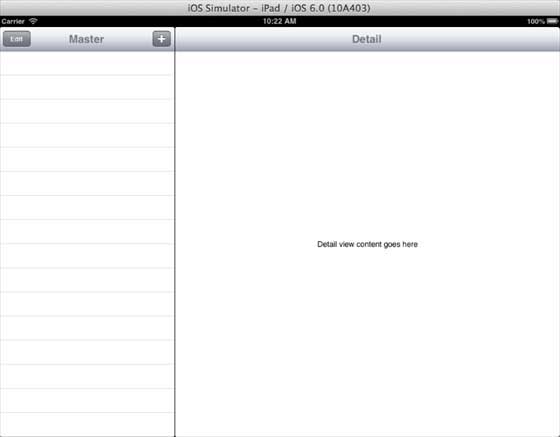
10. Maintenant, lorsque nous exécutons l'application, en mode paysage, nous obtiendrons la sortie suivante
11. Lorsque nous passons en mode portrait, nous obtiendrons la sortie suivante :