jQuery EasyUI レイアウトプラグイン -Layout レイアウト
 jQuery EasyUI プラグイン
$.fn.layout.defaults を介してデフォルトの defaults を上書きします。
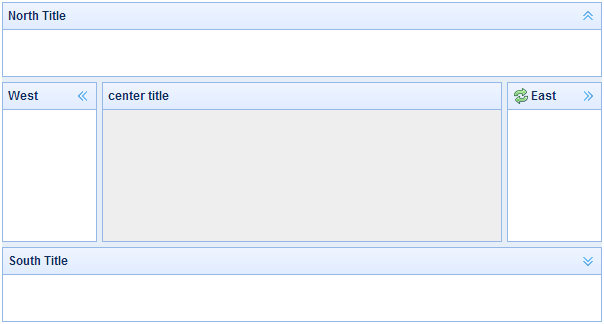
レイアウト(layout)は、5つのリージョン(北 north、南 south、東 east、西 west、中央 center)を持つコンテナです。中央のリージョンパネルは必須で、エッジのリージョンパネルはオプションです。各エッジのリージョンパネルは、境界線をドラッグしてサイズを調整でき、折りたたみトリガーをクリックしてパネルを折りたたむこともできます。レイアウト(layout)はネストできるため、ユーザーは複雑なレイアウトを構築できます。
依存関係
- panel
- resizable
使用法
レイアウト(Layout)の作成
1、マークアップでレイアウト(Layout)を作成します。
'easyui-layout' クラスを <div> タグに追加します。
<div id="cc" class="easyui-layout" style="width:600px;height:400px;">
    <div data-options="region:'north',title:'North Title',split:true" style="height:100px;"></div>
    <div data-options="region:'south',title:'South Title',split:true" style="height:100px;"></div>
    <div data-options="region:'east',title:'East',split:true" style="width:100px;"></div>
    <div data-options="region:'west',title:'West',split:true" style="width:100px;"></div>
    <div data-options="region:'center',title:'center title'" style="padding:5px;background:#eee;"></div>
</div>
2、ページ全体にレイアウト(Layout)を作成します。
<body class="easyui-layout">
    <div data-options="region:'north',title:'North Title',split:true" style="height:100px;"></div>
    <div data-options="region:'south',title:'South Title',split:true" style="height:100px;"></div>
    <div data-options="region:'east',title:'East',split:true" style="width:100px;"></div>
    <div data-options="region:'west',title:'West',split:true" style="width:100px;"></div>
    <div data-options="region:'center',title:'center title'" style="padding:5px;background:#eee;"></div>
</body>
3、ネストしたレイアウトを作成します。
内部レイアウトの西リージョンパネルが折りたたまれていることに注意してください。
<body class="easyui-layout">
    <div data-options="region:'north'" style="height:100px"></div>
    <div data-options="region:'center'">
        <div class="easyui-layout" data-options="fit:true">
            <div data-options="region:'west',collapsed:true" style="width:180px"></div>
            <div data-options="region:'center'"></div>
        </div>
    </div>
</body>
4、ajax でコンテンツを読み込みます。
レイアウト(layout)はパネル(panel)に基づいて作成されます。各リージョンパネルは、URL からコンテンツを動的に読み込む組み込みサポートを提供します。動的読み込み技術を使用することで、ユーザーはレイアウトページをより速く表示できます。
<body class="easyui-layout">
    <div data-options="region:'west',href:'west_content.php'" style="width:180px" ></div>
    <div data-options="region:'center',href:'center_content.php'" ></div>
</body>
レイアウトパネルを折りたたむ(Collpase Layout Panel)
$('#cc').layout();
// collapse the west panel
$('#cc').layout('collapse','west');
ツールボタンで西リージョンパネルを追加
$('#cc').layout('add',{
    region: 'west',
    width: 180,
    title: 'West Title',
    split: true,
    tools: [{
        iconCls:'icon-add',
        handler:function(){alert('add')}
    },{
        iconCls:'icon-remove',
        handler:function(){alert('remove')}
    }]
});
レイアウトオプション(Layout Options)
| 名前 | タイプ | 説明 | デフォルト値 |
|---|---|---|---|
| fit | boolean | true に設定すると、レイアウト(layout)のサイズは親コンテナに適合します。'body' タグ上でレイアウト(layout)を作成すると、ページ全体のフルサイズに自動的に最大化されます。 | false |
リージョンパネルオプション(Region Panel Options)
リージョンパネルオプション(Region Panel Options)はパネル(panel)コンポーネント内で定義されます。以下は共通および追加のプロパティです:
| 名前 | タイプ | 説明 | デフォルト値 |
|---|---|---|---|
| title | string | レイアウトパネル(layout panel)のタイトルテキスト。 | null |
| region | string | レイアウトパネル(layout panel)の位置を定義します。値は次のいずれかです:north、south、east、west、center。 | |
| border | boolean | true に設定すると、レイアウトパネル(layout panel)の境界線が表示されます。 | true |
| split | boolean | true に設定すると、分割バーが表示され、ユーザーはそれを使用してパネル(panel)のサイズを変更できます。 | false |
| iconCls | string | パネル(panel)のヘッダーにアイコンを表示する CSS クラス。 | null |
| href | string | リモートサイトからデータを読み込むための URL。 | null |
| collapsible | boolean | 折りたたみボタンを表示するかどうかを定義します。 | true |
| minWidth | number | パネル(panel)の最小幅。 | 10 |
| minHeight | number | パネル(panel)の最小高さ。 | 10 |
| maxWidth | number | パネル(panel)の最大幅。 | 10000 |
| maxHeight | number | パネル(panel)の最大高さ。 | 10000 |
メソッド
| 名前 | パラメータ | 説明 |
|---|---|---|
| resize | none | レイアウト(layout)のサイズを設定します。 |
| panel | region | 指定されたパネル(panel)を返します。'region' パラメータの値は次のいずれかです:'north'、'south'、'east'、'west'、'center'。 |
| collapse | region | 指定されたパネル(panel)を折りたたみます。'region' パラメータの値は次のいずれかです:'north'、'south'、'east'、'west'。 |
| expand | region | 指定されたパネル(panel)を展開します。'region' パラメータの値は次のいずれかです:'north'、'south'、'east'、'west'。 |
| add | options | 指定されたパネル(panel)を追加します。options パラメータは構成オブジェクトです。詳細については、タブパネル(tab panel)のプロパティを参照してください。 |
| remove | region | 指定されたパネル(panel)を削除します。'region' パラメータの値は次のいずれかです:'north'、'south'、'east'、'west'。 |
jQuery EasyUI プラグイン その他の拡張機能