jQuery EasyUI レイアウトプラグイン -Panel パネル
 jQuery EasyUI プラグイン
$.fn.panel.defaults を使用してデフォルトの defaults を上書きします。
パネル(panel)は、他のコンテンツのコンテナとして使用されます。これは、他のコンポーネント(例:Layout レイアウト、Tabs タブ、Accordion アコーディオンパネルなど)を作成するための基本コンポーネントです。また、折りたたみ、閉じる、最大化、最小化などの組み込みの動作や、その他のカスタム動作も提供します。パネル(panel)は、Web ページの任意の場所に簡単に埋め込むことができます。
使用方法
パネル(Panel)の作成
1、マークアップでパネル(Panel)を作成する
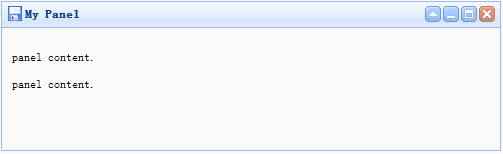
マークアップからパネル(Panel)を作成する方が簡単です。'easyui-panel' クラスを <div> タグに追加します。
<div id="p" class="easyui-panel" title="My Panel"
    style="width:500px;height:150px;padding:10px;background:#FAFAFA;"
    data-options="iconCls:'icon-save',closable:true,
    collapsible:true,minimizable:true,maximizable:true">
    <p>panel content.</p>
    <p>panel content.</p>
</div>
2、プログラミングでパネル(Panel)を作成する
右上隅にツールバーを持つパネル(Panel)を作成しましょう。
<div id="p" style="padding:10px;">
    <p>panel content.</p>
    <p>panel content.</p>
</div>
$('#p').panel({
    width:500,
    height:150,
    title:'My Panel',
    tools:[{
    iconCls:'icon-add',
    handler:function(){alert('new')}
    },{
    iconCls:'icon-save',
    handler:function(){alert('save')}
    }]
});
パネル(Panel)の移動
'move' メソッドを呼び出して、パネル(Panel)を新しい位置に移動します。
$('#p').panel('move',{
    left:100,
    top:100
});
コンテンツの読み込み
ajax を使用してパネル(panel)のコンテンツを読み込み、読み込みが成功したときに情報を表示しましょう。
$('#p').panel({
    href:'content_url.php',
    onLoad:function(){
        alert('loaded successfully');
    }
});
プロパティ
| 名前 | 型 | 説明 | デフォルト値 |
|---|---|---|---|
| id | string | パネル(panel)の id プロパティ。 | null |
| title | string | パネル(panel)のヘッダーに表示されるタイトルテキスト。 | null |
| iconCls | string | パネル(panel)内に 16x16 アイコンを表示する CSS クラス。 | null |
| width | number | パネル(panel)の幅を設定します。 | auto |
| height | number | パネル(panel)の高さを設定します。 | auto |
| left | number | パネル(panel)の左位置を設定します。 | null |
| top | number | パネル(panel)の上位置を設定します。 | null |
| cls | string | パネル(panel)に CSS クラスを追加します。 | null |
| headerCls | string | パネル(panel)のヘッダーに CSS クラスを追加します。 | null |
| bodyCls | string | パネル(panel)の本体に CSS クラスを追加します。 | null |
| style | object | パネル(panel)にカスタム形式のスタイルを追加します。 パネル(panel)の枠線の幅を変更するコード例:
<div class="easyui-panel" style="width:200px;height:100px"
        data-options="style:{borderWidth:2}">
</div>
|
{} |
| fit | boolean | true に設定すると、パネル(panel)のサイズは親コンテナに適応します。次の例は、親コンテナの最大内部サイズに自動でサイズ調整されるパネル(panel)を示しています。<div style="width:200px;height:100px;padding:5px"> <div class="easyui-panel" style="width:200px;height:100px" data-options="fit:true,border:false"> Embedded Panel </div> </div> |
false |
| border | boolean | パネル(panel)の枠線を表示するかどうかを定義します。 | true |
| doSize | boolean | true に設定すると、作成時にパネル(panel)のサイズが調整され、レイアウトが行われます。 | true |
| noheader | boolean | true に設定すると、パネル(panel)のヘッダーは作成されません。 | false |
| content | string | パネル(panel)の本体コンテンツ。 | null |
| collapsible | boolean | 折りたたみボタンを表示するかどうかを定義します。 | false |
| minimizable | boolean | 最小化ボタンを表示するかどうかを定義します。 | false |
| maximizable | boolean | 最大化ボタンを表示するかどうかを定義します。 | false |
| closable | boolean | 閉じるボタンを表示するかどうかを定義します。 | false |
| tools | array,selector | カスタムツールグループ。指定できる値: 1、配列。各要素には iconCls と handler の 2 つのプロパティが含まれます。 2、セレクタ。ツールグループを指定します。 パネル(panel)のツールグループは、既存の <div> タグで宣言できます:
<div class="easyui-panel" style="width:300px;height:200px"
        title="My Panel" data-options="iconCls:'icon-ok',tools:'#tt'">
</div>
<div id="tt">
    <a href="../index.html" class="icon-add" onclick="javascript:alert('add')"></a>
    <a href="../index.html" class="icon-edit" onclick="javascript:alert('edit')"></a>
</div>
パネル(panel)のツールグループは、配列で定義できます:
<div class="easyui-panel" style="width:300px;height:200px"
        title="My Panel" data-options="iconCls:'icon-ok',tools:[
                {
                    iconCls:'icon-add',
                    handler:function(){alert('add')}
                },{
                    iconCls:'icon-edit',
                    handler:function(){alert('edit')}
                }]">
</div>
|
[] |
| collapsed | boolean | パネル(panel)が初期状態で折りたたまれているかどうかを定義します。 | false |
| minimized | boolean | パネル(panel)が初期状態で最小化されているかどうかを定義します。 | false |
| maximized | boolean | パネル(panel)が初期状態で最大化されているかどうかを定義します。 | false |
| closed | boolean | パネル(panel)が初期状態で閉じられているかどうかを定義します。 | false |
| href | string | リモートデータを読み込んでパネル(panel)に表示するための URL。パネル(panel)が開かれない限り、コンテンツは読み込まれないことに注意してください。これは、遅延読み込み(lazy load)のパネル(panel)を作成するのに役立ちます:
<div id="pp" class="easyui-panel" style="width:300px;height:200px"
        data-options="href='get_content.php.html',closed:true">
</div>
<a href="../index.html" onclick="javascript:$('#pp').panel('open')">Open</a>
|
null |
| cache | boolean | true に設定すると、href から読み込んだパネル(panel)コンテンツをキャッシュします。 | true |
| loadingMessage | string | リモートデータの読み込み中にパネル(panel)にメッセージを表示します。 | Loading… |
| extractor | function | ajax レスポンスからコンテンツを抽出する方法を定義し、抽出したデータを返します。
extractor: function(data){
    var pattern = /<body[^>]*>((.|[\n\r])*)<\/body>/im;
    var matches = pattern.exec(data);
    if (matches){
        return matches[1];    // only extract body content
    } else {
        return data;
    }
}
|
イベント
| 名前 | パラメータ | 説明 |
|---|---|---|
| onLoad | none | リモートデータが読み込まれたときに発生します。 |
| onBeforeOpen | none | パネル(panel)が開く前に発生します。false を返すと開くのを止めます。 |
| onOpen | none | パネル(panel)が開いた後に発生します。 |
| onBeforeClose | none | パネル(panel)が閉じる前に発生します。false を返すと閉じるのをキャンセルします。次に宣言されたパネル(panel)は閉じません。
<div class="easyui-panel" style="width:300px;height:200px;"
        title="My Panel" data-options="onBeforeClose:function(){return false}">
    The panel cannot be closed.
</div>
|
| onClose | none | パネル(panel)が閉じた後に発生します。 |
| onBeforeDestroy | none | パネル(panel)が破棄される前に発生します。false を返すと破棄をキャンセルします。 |
| onDestroy | none | パネル(panel)が破棄された後に発生します。 |
| onBeforeCollapse | none | パネル(panel)が折りたたまれる前に発生します。false を返すと折りたたみを止めます。 |
| onCollapse | none | パネル(panel)が折りたたまれた後に発生します。 |
| onBeforeExpand | none | パネル(panel)が展開される前に発生します。false を返すと展開を止めます。 |
| onExpand | none | パネル(panel)が展開された後に発生します。 |
| onResize | width, height | パネル(panel)のサイズが変更された後に発生します。 width:新しい外部幅 height:新しい外部高さ |
| onMove | left,top | パネル(panel)が移動した後に発生します。 left:新しい左位置 top:新しい上位置 |
| onMaximize | none | ウィンドウが最大化された後に発生します。 |
| onRestore | none | ウィンドウが元のサイズに復元された後に発生します。 |
| onMinimize | none | ウィンドウが最小化された後に発生します。 |
メソッド
| 名前 | パラメータ | 説明 |
|---|---|---|
| options | none | オプション(options)プロパティを返します。 |
| panel | none | 外部パネル(panel)オブジェクトを返します。 |
| header | none | パネル(panel)のヘッダーオブジェクトを返します。 |
| body | none | パネル(panel)の本体オブジェクトを返します。 |
| setTitle | title | ヘッダーのタイトルテキストを設定します。 |
| open | forceOpen | forceOpen パラメータが true に設定されている場合、onBeforeOpen コールバック関数をバイパスしてパネル(panel)を開きます。 |
| close | forceClose | forceClose パラメータが true に設定されている場合、onBeforeClose コールバック関数をバイパスしてパネル(panel)を閉じます。 |
| destroy | forceDestroy | forceDestroy パラメータが true に設定されている場合、onBeforeDestroy コールバック関数をバイパスしてパネル(panel)を破棄します。 |
| refresh | href | パネル(panel)を更新してリモートデータを読み込みます。'href' パラメータが割り当てられている場合、古い 'href' プロパティを上書きします。 コード例:
// open a panel and then refresh its contents.
$('#pp').panel('open').panel('refresh');
// refresh contents with a new URL.
$('#pp').panel('open').panel('refresh','new_content.php');
|
| resize | options | パネル(panel)のサイズを設定し、レイアウトを実行します。Options オブジェクトには次のプロパティが含まれます: width:新しいパネル(panel)の幅 height:新しいパネル(panel)の高さ left:新しいパネル(panel)の左位置 top:新しいパネル(panel)の上位置 コード例:
$('#pp').panel('resize',{
    width: 600,
    height: 400
});
|
| move | options | パネル(panel)を新しい位置に移動します。Options オブジェクトには次のプロパティが含まれます: left:新しいパネル(panel)の左位置 top:新しいパネル(panel)の上位置 |
| maximize | none | パネル(panel)をそのコンテナのサイズに適応させます。 |
| minimize | none | パネル(panel)を最小化します。 |
| restore | none | 最大化されたパネル(panel)を元のサイズと位置に戻します。 |
| collapse | animate | パネル(panel)の本体を折りたたみます。 |
| expand | animate | パネル(panel)の本体を展開します。 |
jQuery EasyUI プラグイン その他の拡張